

AEC Assistant Update 5: A New Tuned Model, a Deeper Read of Your Drawings, and Longer Work Ahead
AEC Assistant keeps getting better: a new tuned model that follows a question through related provisions, a deeper read of your drawings and clause clips, answers that keep going when you close the tab, and longer-running work on the way.
AEC Assistant keeps getting better. Since Update 4 we have shipped six releases in two weeks, and Update 5 brings them together: a new model tuned for the questions you bring to it, a deeper read of your drawings, and the groundwork for longer pieces of work. This post covers what changed, what it means for your projects, and what we are building next.
In one minute
A new tuned model. AEC Assistant now runs on a new model, tuned for work in the built environment and tested against our own benchmarks and evaluations. It follows a question through related provisions instead of stopping at the first table, and it is more likely to tell you when a clause you have pasted in does not settle the question.
A more careful free plan. Every answer on the free Core plan now takes more time and care.
A deeper read of your drawings. Attach a drawing, a detail or a clause clip, or work inside a project, and the assistant thinks longer for the rest of the conversation. More file types are accepted, and large drawing sets upload reliably.
Work that keeps going. An answer in progress survives a closed tab or a dropped connection. Next, we are building towards longer tasks you can hand over and redirect while they run.
1. A new model, tuned for AEC Assistant
Every answer on a paid plan now runs on a new model, tuned for AEC Assistant. The model is new; the tuning is ours.
Before we switched, we ran it through our own benchmarks and evaluations. They cover every area the assistant works in, from the building code and planning to fire safety, contracts, inspections and product checks, and they include hard cases the previous model got wrong. The new model did better, and three differences stood out.
It follows a question through the Code
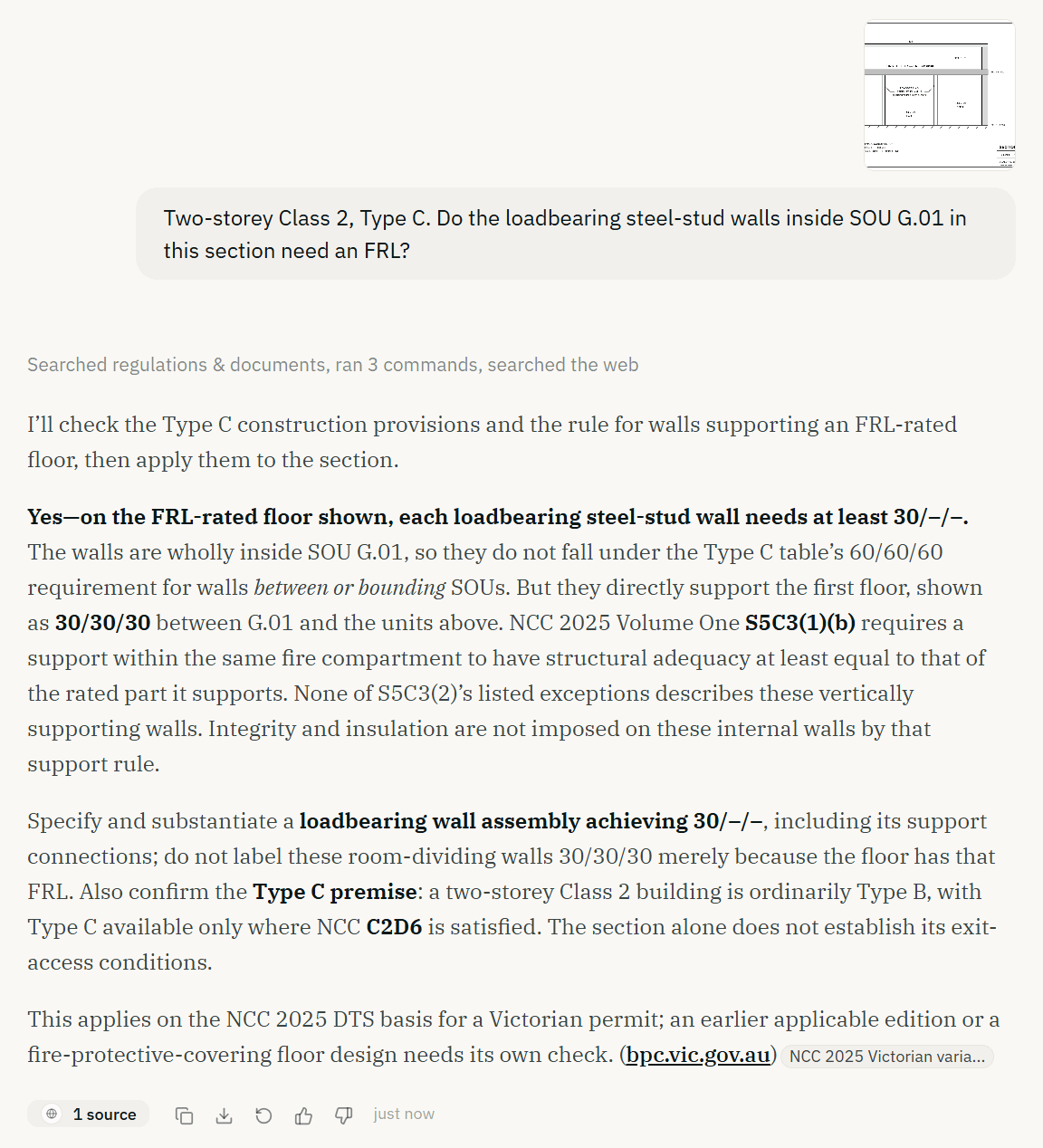
Many compliance questions are not answered by the first provision you find. Take a two-storey Class 2 apartment building of Type C construction. The floor between the storeys needs an FRL of 30/30/30. Inside a ground-floor unit, loadbearing steel-stud walls hold that floor up. Do the walls need a fire-resistance level?
Look them up in the Type C table for internal walls and you will find nothing for walls inside a sole-occupancy unit. Stop there, and the answer is that no rating is needed. That answer is wrong. NCC 2025 Volume One S5C3, fire protection for a support of another part, says a part that holds up an element with an FRL takes on that element's structural adequacy. The walls need 30/–/–.
The previous model often stopped at the table. In our testing, the new model follows the question to the support rule and reaches the right answer. For the wider picture of how FRLs, the three construction types and their tables fit together, see our guide to fire-resistance levels.
Here is the same question asked in AEC Assistant, with a section of the unit attached.
It tells you when a clause does not settle the question
Suppose you paste in the clause you are working from, S5C24(1)(e), which says a floor between storeys "and any column supporting the floor" must be 30/30/30, and ask whether that means the walls are exempt because only columns are named. The new model is more likely to disagree with you and explain why: the clause names columns, but the support rule applies separately, so the walls are still caught. A second opinion is only useful if it will tell you when you are wrong.
It checks more before it answers
The new model looks further through the Code and the related legislation before it commits to an answer. Each answer now ends with what to do, check or decide next, in plain words.
On the free plan
The free Core plan went through the same benchmarks and evaluations before the switch, and every Core answer now takes more time and care. Plus and Max get the most capable model.
2. Drawings, clips and documents get a deeper read
The hardest questions usually start with a drawing, a detail or a clip of a clause, and that is where a quick read costs the most. Over the last few releases, they have been getting more care.
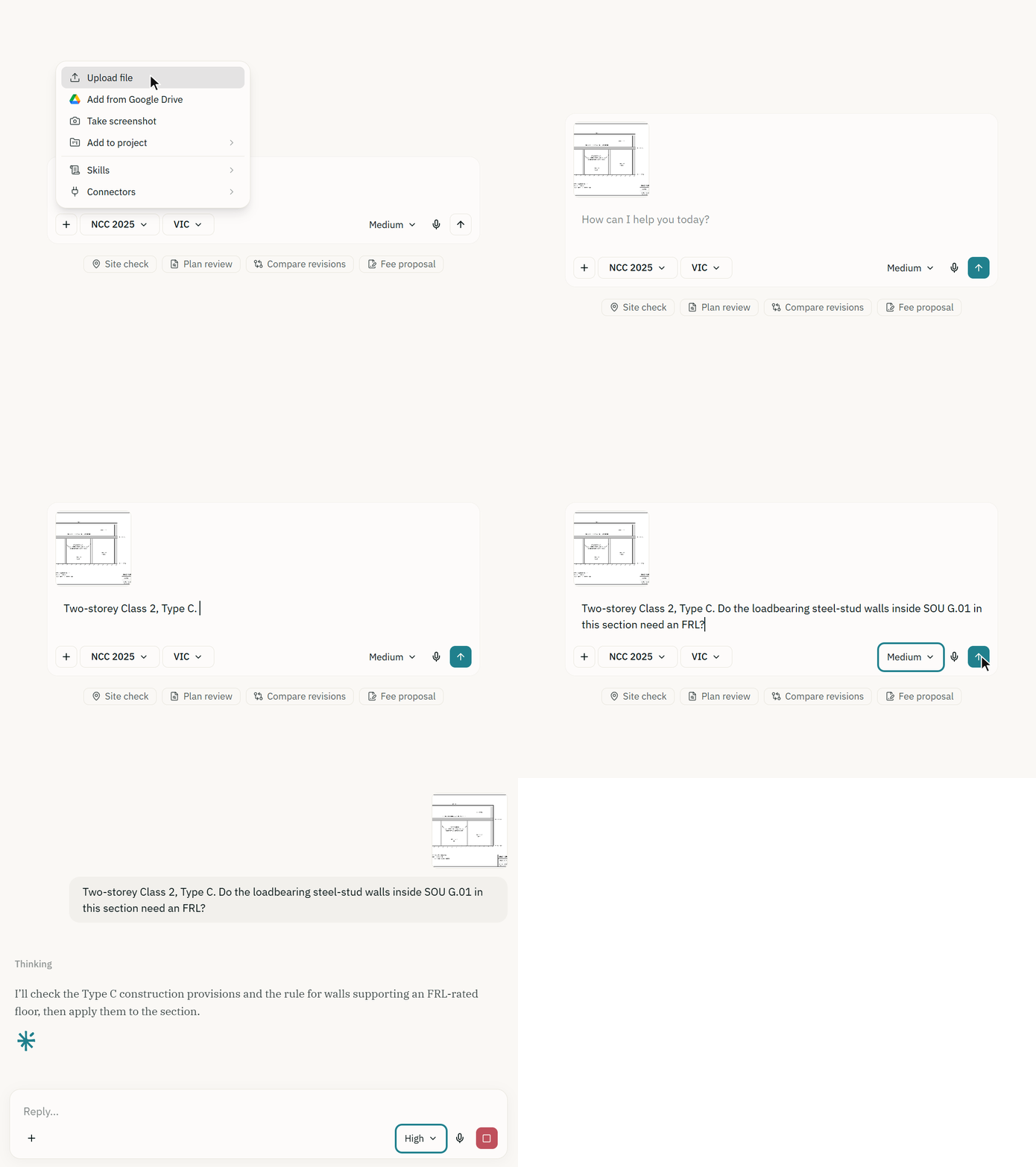
Upload a drawing, and it thinks longer. Attach a drawing, a detail or any other file and the assistant thinks longer before every answer for the rest of that conversation, including when you come back to it later.
Project chats get the same care. A chat inside a project thinks longer for the whole conversation, because the project's drawings, memory and site data are in play.
It reads what is drawn. Dimensions, symbols and markups on your sheets are part of the answer when the question depends on them.
Bring more of your files. Site photos and image exports of drawings can go into a project, and a chat takes the same files a project does, including Word, Excel and PowerPoint files and emails.
Large drawing sets upload reliably. Big drawing sets and reports no longer fail part-way through uploading, and you can ask about them shortly after they land. You can also open your project documents from inside AEC Assistant.
It says when a file is too large. When a document is too large to open in full, the assistant tells you and suggests uploading the sheets you need, rather than guessing.
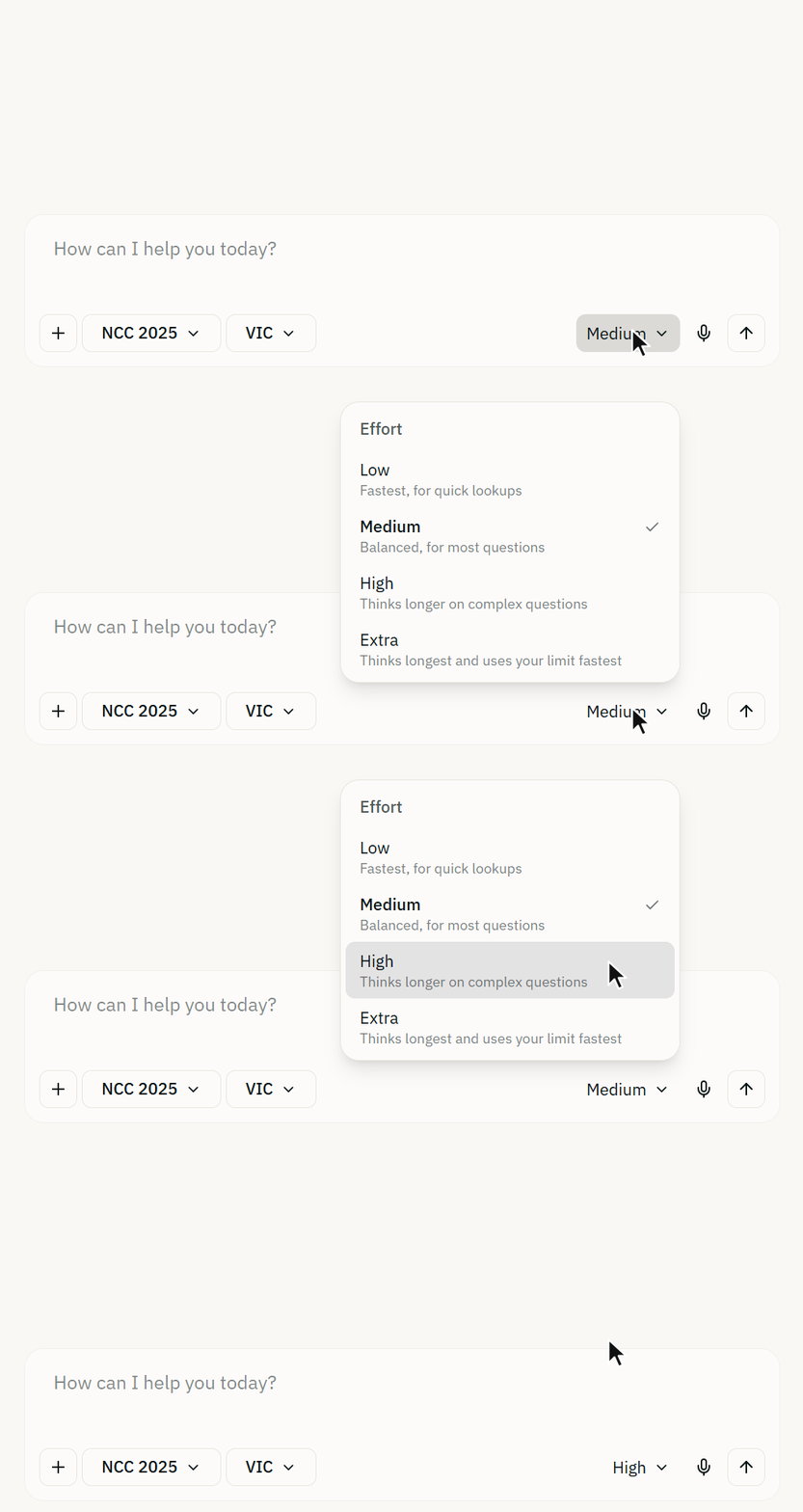
You do not need to set anything: the assistant thinks longer whenever drawings or documents are in play. For a hard question you can turn the effort dial up further, or down when you want a quick answer.
3. Work that keeps going, and where we are taking it
A thorough answer to a hard question can take a while, and a review of a whole drawing set takes longer still. Over the last few releases, that work has become safe to leave.
Close the tab, and it keeps going. An answer in progress survives a closed tab or a dropped connection. Reopen the conversation and it picks up where it was. If your internet drops mid-answer, you still get the whole answer.
A started question always gets its full answer, even when you are close to your usage limit.
It waits for your go-ahead. When the assistant needs your approval before changing something in a project, the request stays open for seven days.
You can see what is running. Chats and tasks share one list, each with a dot that shows whether it is working, waiting on you or stopped.
That is the groundwork. What we are building on it is longer-running work:
Hand over a larger job. Checking a full drawing set against the Code sheet by sheet, working through a checklist across a whole project, or assembling a report from many sources, with the assistant carrying the job through instead of you breaking it into separate questions.
Redirect it while it works. If a long task is heading the wrong way, you will be able to add a correction as it runs, instead of stopping it and starting again.
These are in progress and not available yet. We will say so in the release notes as each one ships.
4. Also in this update
74 more Acts, regulations and codes of practice, including every state and territory's heritage, environment protection and architects legislation, the engineers registration Acts, the model work health and safety Codes of Practice and the NSW fire safety and design practitioner regulations, so questions in those areas are answered from the legislation itself.
The NCC edition in force where your project is. NCC 2025 applies in the Commonwealth, the ACT, Tasmania, Victoria and Western Australia from 1 May 2026. New South Wales, Queensland and South Australia move to it on 1 May 2027, and the Northern Territory has not adopted it. Projects in those states are now answered against the edition in force there.
Product questions from the manufacturers' own manuals. CSR Gyprock, Knauf, Siniat, James Hardie and Hebel wall, floor and facade systems are answered from the manuals themselves, on every plan.
An effort dial for hard questions. Turn it up and the assistant thinks longer before it answers, or turn it down when you want a quick one.
Documents that look the part. Reports, schedules and slides the assistant creates for you now share one consistent, professional look.
Plans, plainly
The free Core plan does the asking: NCC 2025 and NCC 2022 search with sources, planning information for every state and territory, and a weekly usage allowance. Plus and Max add the most capable model, deeper knowledge of the standards the code references, and projects that hold your drawings, documents and site information. Details and current pricing are on the pricing page, and every change is listed in the release notes.
The quickest way to see the difference is to ask it a question you already know the answer to.
Update 4 was published on 2 September 2026. This update covers releases 1.5 to 1.9, from 9 to 23 September 2026.