
What's new
Every release, in plain language. The same notes the app shows in Settings.
- v1.19.0
New
- Product checks now read the official registers live: ask about a CodeMark certificate, a WaterMark licence, a window’s WERS rating, a WELS or GEMS registration, an ActivFire certificate or a steel supplier’s ACRS certification, and the answer gives its status, expiry and conditions as the register shows them that day.
- Wall, ceiling, window and framing systems from CSR, Siniat, James Hardie, Knauf, Capral and Rondo are now checked against each manufacturer’s current system data, with the fire and acoustic ratings, the evidence named behind each figure and the manufacturer’s drawings.
Improved
- When a certificate is supplied as evidence of suitability, the assistant now checks it against the register as well as the copy you were given, so a certificate that has since been suspended, withdrawn or reissued is caught.
- v1.18.7
Fixed
- Questions are answered again; from early on 21 October every question ended in an error, and none of those failed questions counted towards your usage.
- v1.18.6
Fixed
- Scheduled emails, such as tips in your first week and reminders about a project you started, now reach you; since they were switched on, only the welcome email had been sent.
- v1.18.5
Improved
- Answers cite the published text of the NCC, Standards and regulations rather than draft or preview copies, and their NCC links match the edition the answer is written for.
Fixed
- On the free Core plan, the upload options now show greyed with a note that file uploads come with paid plans, and the assistant says so if you ask to share a drawing or document, rather than suggesting a file has arrived.
- v1.18.4
New
- When an answer draws on a page of a project document, it links to that page, and its sources show the page itself; click it to open the document there.
- Sources also find and show the page a passage from a project document came from.
Fixed
- A project file the assistant finds it can no longer read is marked “Re-upload” in the project’s files, and the assistant tells you which files to upload again.
- A file the assistant only read is no longer offered as a download in an answer’s sources.
- v1.18.3
Fixed
- Photos and files can now be attached to a question asked from a project’s page, and they go with it into the chat.
- A project document the assistant cites is now marked as a project file in its sources, and opens when you click it.
- v1.18.2
Improved
- A new Plus or Max subscription comes with twice the usual usage for its first seven days, so trying it on a real job does not run into the weekly limit on day one.
- v1.18.1
Fixed
- A note in your project, team or personal memory can no longer stop the assistant from answering your questions.
- Documents you add to a project are labelled by discipline and document type from what they contain again, rather than only from their file name.
- v1.18.0
New
- House plans can now be checked against the Deemed-to-Satisfy provisions for footings, wind classification, timber framing, bracing and tie-down, termites, safety glass, balustrades, fire separation and smoke alarms, with a clear line where an engineer is needed.
- Energy compliance now has its own review: the assistant checks a NatHERS certificate against the plans, reads BASIX certificates and Section J reports, and applies the edition NCC 2025 sets for apartments.
- Builders can draft a SWMS, a WHS management plan, a site induction and a risk register from their project details, with every site fact left for them to fill in, and have a subcontractor’s SWMS checked.
- Floor areas, lengths, counts and volumes can now be measured from PDF, DXF and IFC drawings into a bill of quantities spreadsheet, each quantity with its source.
- A design’s siting can now be checked against your state’s setback, site coverage, height, overlooking and private open space rules, measured from the drawings.
- The assistant can build a notice and time-bar register from your contract and correspondence, and level quotes or tenders side by side.
Improved
- The regulatory library is up to date: the NSW Work Health and Safety Regulation 2025, the current SA Planning and Design Code, the latest Victorian Building Regulations and OHS legislation, WorkSafe Victoria compliance codes and the Building Commission NSW guides are in, and superseded documents are out.
Fixed
- NCC notes that sit outside clauses, such as the note sending Class 2 energy compliance to NCC 2022 Amendment 2 and each state’s Part deletions, now come through in answers, the NCC’s formulas read correctly, and NCC 2022 clauses no longer carry NCC 2025 wording.
- v1.17.0
New
- You can now attach a Primavera P6 programme export (.xer), in chat or to a project, and the assistant can read its activities, logic and float to find the critical path or test a delay.
- Compare two revisions of a drawing set and the assistant shows each change on an overlay of every changed sheet, collected into one PDF for your transmittal.
- The assistant can now write a further-information request to an applicant, a register that closes out a resubmission item by item, an inspection and test plan with hold and witness points, and a site diary entry from your notes and photos.
- Site area, frontage, setbacks, slope and cut and fill can now be measured from the survey, GIS and terrain files you attach, each given as an indicative figure with its source.
Improved
- The assistant reads drawings, photos, spreadsheets and emails more like an experienced reviewer: text first, then a close look at the part of a sheet or photo a finding depends on, and it gives you the sheets it relied on.
- Site photos are now dated from the camera’s own record of when they were taken, and a photo without one is reported as undated rather than given a date.
- Address search and site maps on projects now use Google Maps, and picking an address fills in its state and local council from the same lookup.
Fixed
- Spreadsheets with formulas that the assistant creates now carry their calculated values, so the figures show in previews and other apps, not only once Excel recalculates them.
- v1.16.0
New
- You can now attach Apple Pages, Keynote and Numbers files, in chat or to a project, and the assistant can read what they contain.
- Chat attachments can now be up to 96 MB each, the same as project documents, and the 50 MB limit across a single message is gone.
Improved
- Every file you attach, including Word documents, spreadsheets, emails and photos, now opens in the assistant’s workspace, where it can extract, convert and compare what it needs rather than reading the whole file at once.
- v1.15.0
New
- Planning reports now give the current wording of the zones, overlays and clauses that apply to a site, each with the amendment it reflects, and the assistant reads the official documents a report links to rather than working from memory.
- When a project’s address is not exactly a property in the state’s address register, the project page asks “Did you mean…?” with the closest real addresses, those on your street first, instead of reporting on a neighbouring property.
- A project can be a site of several lots. When an address is typed as a range that the register holds as separate properties, “Use them together as one site” adds each as a consolidated lot, and planning assessments look at each lot and then at the site as a whole.
Improved
- Site information on a project now shows its constraints, heritage checks, car parking, the planning scheme version and anything that could not be checked.
- Planning reports cover more in every state and territory, including the fire authority and the road beside the lot in Victoria, and full application, amendment and heritage details in South Australia.
Fixed
- A planning check whose source did not answer was sometimes reported as “none”, for example an ACT site as not bushfire prone. It is now reported as not checked, so a gap is never read as an all-clear.
- v1.14.0
New
- You can now attach DXF, IFC, STEP, IGES, STL, OBJ, glTF, KML, KMZ, GeoPackage, GeoJSON, zipped shapefile and TIFF files, in chat or to a project, and the assistant can read what they contain.
- Drawing sets over 50 MB added to a project, including scanned sets, can now be read; before, they could not be opened.
Improved
- The assistant now zooms in on the part of a drawing it needs, so it can read small dimensions, notes and symbols.
- PDFs and drawings are now read page by page as needed rather than all at once, so questions about a plan set use less of your weekly limit.
Fixed
- Long tasks, such as reviewing a drawing set, were counted against your weekly limit as larger than they were; they are now counted correctly.
- Attaching a PDF or Word document to a chat no longer fails with an error.
- v1.13.0
New
- The ramp calculator now works out the length of run a rise needs, or the rise a run reaches, as well as the gradient; with no gradient given it uses the steepest the kind of ramp may be.
- The ramp calculator now takes the levels as the RLs on your drawings, and a gradient as 1 in N, a percentage or degrees.
Improved
- The stair, ramp, occupancy and exits, light and ventilation and sanitary facilities calculators can now also be used on the AEC Assistant website, with the same answers as the app.
- v1.12.3
Improved
- Where a single wall is more than 10 m high, the drainage calculators now show in their working that it is counted at 10 m, as AS/NZS 3500.3 allows, beside the height you entered.
Fixed
- For a box gutter fixed between two points, such as two sumps, the box gutter calculators now give every expansion joint AS/NZS 3500.3 Table 4.3.2 needs, and where to place a single joint, instead of always giving one.
- v1.12.2
Fixed
- A long answer, such as a drawing review, no longer disappears from the chat after it finishes.
- Long-running work, such as reviewing a large drawing set, no longer stops with an error after ten minutes.
- v1.12.1
Improved
- The drainage calculators now record which calculator was used and whether its result passed, failed or sized the design, never the figures you enter, so we can see which calculators people rely on and improve those first.
- v1.12.0
Improved
- On paid plans, answers now come from a newer, tuned revision of the model, built for complex professional work; your conversations carry on where they left off.
- v1.11.0
New
- Ask the assistant to size a gutter, downpipe, box gutter, stormwater pipe or water pipe and it now asks you for the inputs that decide the answer, such as the site, the roof and the gutter, instead of assuming them, then gives you the calculator filled in, where you can check or change any input, and its calculation report for your building surveyor.
- The eaves gutter and downpipe calculator now also sizes by the NCC 2025 Housing Provisions Part 7.4 tables, for a Class 1 or 10 building outside Victoria, beside AS/NZS 3500.3.
- In the eaves gutter calculator you can now choose your gutter from a maker’s range: the result uses the effective area the maker publishes and names the maker’s document.
- The downpipe spreader calculator can now check that the lower roof’s sheets carry the spreader’s water, from the roofing maker’s own drainage table.
- A new balcony, terrace and flat roof drainage calculator sizes the outlets and the overflow and, for a Class 2 to 9 building, checks the NCC 2025 Volume One F1D4 fall, step down and hob.
- After a result, a drainage calculator now links the calculator to run next, such as the overflow for an eaves gutter or the stormwater pipe for a box gutter, filled in with the inputs you gave and the figures worked out from them.
- Every calculator in the app now has Ask AEC Assistant beside Export report and Share: the assistant picks up your calculation, walks you through anything it still needs one question at a time, with answers you can click, and hands back the result with its calculation report for your building surveyor.
Improved
- Every drainage calculator opens on an example and now says so: the result reads Example result, with the inputs that decide it marked, until you enter your own.
- The calculation report now opens with the design basis, the method, rainfall and catchment behind the result, and ends with a sign-off for the person who prepared it and the person who checked it.
- Slopes and falls can be entered as the drawings give them, a roof pitch as 1:4 or 25% and a fall as 1:200, 0.5% or 5 mm/m, in every calculator field and table that takes one.
- Calculators ask only questions with more than one possible answer: the eaves gutter calculator asks which route to use only for a Class 1 or 10 building outside Victoria, where both are open, and does not ask for the maker once you have named the gutter.
- Ask AEC Assistant under a calculator on our website now opens that calculation in the app with the inputs you entered, ready to hand to the assistant with one press of Ask AEC Assistant.
- Share on a calculator now works the way it does for a chat: choose Create public link and the link to the calculator with your inputs is made and copied for you.
- The calculators stay free to use without an account; Export report and Share now need a free account, and signing in or signing up brings you straight back to your calculation with the report or the share ready.
- v1.10.0
New
- Roof drainage, box gutter, site stormwater and water supply calculators to AS/NZS 3500.3:2025 and AS/NZS 3500.1:2025 are now in Tools: roof catchments, eaves and valley gutters, downpipes and overflow, box gutter sumps, stormwater pipes and networks, overland flow, pits, charged downpipes, on-site detention, pump-outs and water pipe sizes.
- Each of them exports a calculation report for your building surveyor, with the inputs, every check and the clause behind it, and the full working.
- Every calculator in Tools, the NCC tools included, now has Export report and Share beside its title: the report is a PDF for your building surveyor, and Share copies a link that opens the calculator with your inputs.
- Ask a sizing or compliance question in chat, about a stair, a ramp, contrast, light and ventilation, exits, sanitary facilities, gutters, stormwater or water pipes, and the assistant now runs the matching calculator rather than working the numbers out itself, then links you to that calculator filled in with the same inputs.
- Ask AEC Assistant about this result, under every calculator, takes the result into chat, where the assistant explains it and tries changes with the same calculator.
Improved
- Tools are grouped by discipline, with the new drainage calculators beside the NCC tools.
- Gutters & Downpipes applies the NCC 2025 Housing Provisions Part 7.4 tables, for Class 1 and 10 buildings outside Victoria, and points you to the new calculators for every other case, box gutters included.
- When the assistant runs a calculator, the step shows in its activity, so you can see the figures came from the calculator.
- v1.9.0
Improved
- Answers now come from a newer, more capable model that follows a question through related provisions more reliably — for example, whether an element that supports a fire-rated floor needs a fire rating of its own.
- When you paste in a clause and ask whether it settles the question, the assistant is now more likely to tell you when another provision also applies.
- On the Core plan, answers now think at High by default; you can still choose another level from the button beside Send.
- Answers now close with what to do, check or decide next in plain words, rather than under a “Bottom line” label.
- v1.8.1
Fixed
- Text you paste into a message — an email with an indented list, for example — now stays inside your message as you typed it, line breaks included, instead of running off the side of the chat.
- If your connection drops while an answer is being written, the chat now reconnects and finishes the answer, instead of your question and the answer so far disappearing until you reloaded the page.
- Images attached to a chat show their preview again when you reopen the conversation.
- A question that has started now always gets its full answer, even when you are close to your usage limit, instead of stopping part-way with nothing delivered.
- Sending a message twice in quick succession no longer marks the chat as stopped while its answer is still being written.
- The assistant no longer says it could not find or verify something without first searching for it.
- v1.8.0
New
- Attaching an image or a file now moves that chat to High for the rest of the conversation — every later question, and the chat when you reopen it — because a clause clip or a detail is where a shallow read costs the most; a chosen Extra is kept.
- A chat inside a project now runs at High for the whole conversation, for the same reason: the project’s drawings, memory and site data are in play.
- Product questions are now answered from the manufacturers’ own manuals — CSR Gyprock, Knauf, Siniat, James Hardie and Hebel wall, floor and facade systems — on every plan, before the assistant looks anywhere else.
Improved
- A fire-resistance question about one building element now also checks the provisions that sit outside its table row — what the element supports, what separates it from other parts, and the concessions — before giving a yes or no.
- The weekly usage allowance on the Plus and Max plans has been raised.
Fixed
- After a guided plan review, the assistant no longer keeps answering your follow-up questions at the lower thinking level it uses for the intake questions.
- v1.7.0
New
- You can now choose how much thought goes into an answer — Low, Medium, High or Extra — from the button beside Send; the higher levels take longer and use more of your usage limit, and every new chat starts back at Medium.
- Projects now accept images — PNG, JPG, GIF and WebP — and the assistant can look at them when you ask about the project.
- Chat attachments now take the same files as projects, including Word, Excel, PowerPoint, CSV, text and email (EML and MSG), not only images and PDFs.
- The + menu in the message box now lists the assistant’s skills: pick one to ask for that kind of work, and if it does not suit your question the assistant says what it used instead.
Improved
- Follow-up questions in a long conversation now reuse far more of what has already been processed, so each one uses less of your usage limit.
- Long conversations now keep their full detail for longer before older parts are condensed.
Fixed
- Large project documents no longer stay stuck at indexing; they become searchable shortly after they upload.
- Project documents you upload can now be opened from AEC Assistant; a document uploaded before this release asks to be uploaded again, because no viewable copy of it was kept.
- Spreadsheets, CSV, XML and email files in a project are no longer shown as failed to index: they are marked not searchable, and the assistant opens them to read them.
- When a project document is too large for the assistant to open in full (over 50 MB), it now says so and suggests uploading the pages you need, instead of the answer ending in an error.
- SVG files are no longer accepted as attachments or project documents, because the assistant cannot read them and trying ended the answer in an error.
- The usage meter now counts a very large request — reading a long drawing set in full, for example — at the higher rate such requests carry, so your limit reflects what it actually uses.
- The message box on a project page now grows as you type a longer question, instead of staying two lines tall.
- Project names in the + menu’s Add to project list no longer get cut off.
- The divider in the jurisdiction picker no longer highlights as though it were an option.
- v1.6.0
New
- The searchable library has grown by 74 instruments: every state and territory’s heritage, environment protection and architects legislation, the engineers registration Acts, the NSW fire safety and design practitioner regulations, Queensland’s Planning Act, QBCC Act and plumbing legislation, the twenty model work health and safety Codes of Practice, the Commonwealth environment Act, the emergency lighting and exit sign maintenance Standard, and the South East Queensland and Icon Water design codes — so questions in those areas are now answered from the instrument itself.
- Chats and tasks now share one list in the sidebar, each marked with a dot showing whether it is idle, working, waiting on you or stopped, and a Filter and group menu narrows the list by type or recent activity, groups it by date, type or state, and sorts it — by latest activity unless you choose otherwise.
Improved
- Word, Excel, PowerPoint and PDF files the assistant creates now share one consistent house style, with the same typefaces, colours, table styling and AEC Assistant mark on every document.
- Every specialist area the assistant works in — building code, planning, fire safety, contracts, inspections and the rest — has been rechecked clause by clause against the NCC, the Standards and state legislation, so construction types, building classifications, inspection stages and contract clause numbers now match the source documents rather than a paraphrase of them.
- A clause reference that changed between NCC editions is now labelled with the edition it belongs to, so a 2019 reference is never quietly read as the 2025 clause of the same number.
- When a requirement sits in an instrument outside the searchable library, the assistant now names that instrument and looks it up on the public record instead of answering as though it did not exist.
Fixed
- A project in New South Wales, Queensland, South Australia or the Northern Territory is now answered against the NCC edition in force there — those states move to NCC 2025 on 1 May 2027, and the Northern Territory has not adopted it — rather than against the newest edition published.
- The NCC year shown on a project and in the chat selector now reflects the edition the project’s state has adopted, so “NCC Current” means current where the project is.
- A Western Australian security of payment question is now answered from the Building and Construction Industry (Security of Payment) Act 2021 — the library had been holding a different Act under that title, so payment claims and adjudication were being answered from work health and safety law.
- A Victorian security of payment question is now answered from the current Act, which since April 2026 also covers the release of performance securities.
- v1.5.0
New
- An answer in progress now survives a closed tab or a dropped connection: reopen the conversation and it picks up where it was, with a Stop button to end it.
- Actions waiting for your approval now stay open for seven days instead of one, and an expired request says so rather than failing silently.
- The assistant now knows the current date and time in your project’s time zone, so questions about deadlines and in-force dates are answered against today.
Improved
- Project documents and chat attachments now stream straight to storage as they upload, so large files no longer fail part-way through.
- A long answer that reaches its limit now ends with a note saying so, instead of stopping mid-sentence.
- When an answer would carry you past your usage allowance it finishes the current step and tells you, rather than being cut off.
- Sharing a project is now a team feature: on a Team plan you share with your teammates, and without a team the dialog offers to create one or upgrade.
- On the Core plan the assistant now says when an answer would need Standards your plan does not include, rather than answering as though they did not exist.
- The building-class picker opens downward with a scrolling list, so the whole list is reachable on small screens.
- The Files tab no longer shows an account-wide storage figure that did not reflect your project.
- The public calculator pages now carry search-friendly titles and descriptions.
Fixed
- Only the person who uploaded a chat attachment, or an administrator, can now retrieve its stored copy.
- A conversation reopened while its answer was still being written no longer shows the answer as interrupted.
- Emails now use screenshots of a demonstration project rather than a real one.
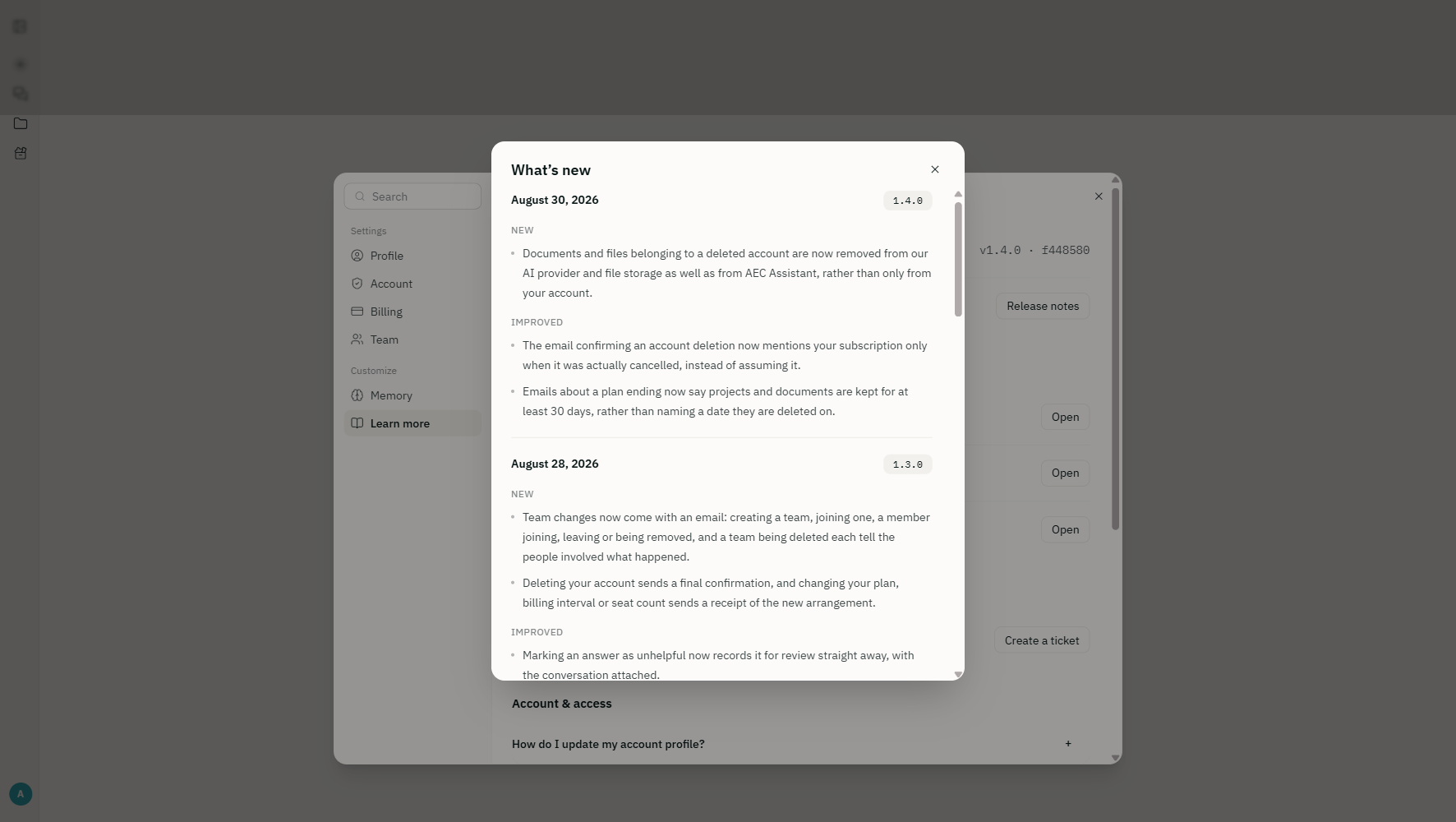
- v1.4.0
New
- Documents and files belonging to a deleted account are now removed from our AI provider and file storage as well as from AEC Assistant, rather than only from your account.
Improved
- The email confirming an account deletion now mentions your subscription only when it was actually cancelled, instead of assuming it.
- Emails about a plan ending now say projects and documents are kept for at least 30 days, rather than naming a date they are deleted on.
- v1.3.0
New
- Team changes now come with an email: creating a team, joining one, a member joining, leaving or being removed, and a team being deleted each tell the people involved what happened.
- Deleting your account sends a final confirmation, and changing your plan, billing interval or seat count sends a receipt of the new arrangement.
Improved
- Marking an answer as unhelpful now records it for review straight away, with the conversation attached.
Fixed
- Leaving a team now ends your access to its shared projects straight away, the same as being removed from one.
- v1.2.0
Improved
- Usage limits are now a rolling weekly allowance rather than a monthly question count, so a busy week is not held to a calendar — room frees up as older activity ages out. The account menu names the limit that applies and when it eases.
- Emails about your account now say how long projects and documents are held after a plan ends, and name the state chosen at sign-up as the default jurisdiction.
- v1.1.0
New
- Added this What’s new window, so each release says what changed. Open it any time from Settings › Learn more.
- Added a product updates preference in Settings › Account, controlling whether we email you about new features.
Improved
- Attachments can now be up to 32 MB each, and up to 50 MB across a single message.
- Settings › Help is now Settings › Learn more, gathering the release notes, usage policy, privacy policy, and terms of service in one place.
Fixed
- Fixed the assistant failing to read a document whose file extension was uppercase, such as .PDF.
- Fixed the installed app’s splash screen stretching when an iPad was held in landscape.
- Fixed the composer’s context chips sitting taller than the text beside them, and removed a stray scrollbar from the sources rail.
- v1.0.0
New
- Rebuilt the platform end to end, on new accounts and a new database. Sign in with a six-digit email code, Google, or Microsoft.
- Added project sharing. Invite people from your firm to a project as viewers or editors, or open it to everyone in your organisation.
- Added installable apps. AEC Assistant can now be installed on an iPhone, iPad, Android device, or desktop and opens without browser chrome.
- Added public chat links, so an answer can be shared with someone who does not have an account.
- Added seven NCC calculators: ramps, stairs, luminance contrast, light and ventilation, occupancy and egress, sanitary facilities, and gutters and downpipes.
- Added guided actions on the home screen for site checks, plan reviews, revision comparisons, and fee proposals.
- Added project memory — notes kept per project, per team, and per person that the assistant reads on every question.
- Added document attachments in the composer, and typing / to point a question at a specific project document.
Improved
- NCC 2025 is now the edition answered against by default, in every state and territory.
- Appearance now follows your system light or dark setting unless you choose otherwise.
- Answers now show their sources and their reasoning as they arrive, rather than only at the end.
Fixed
- Fixed a chat that lost its connection mid-answer showing a blank page. The answer is now recovered and shown.
- Fixed uploads failing when a file’s extension was uppercase, such as .PDF.
Ask it the question you were about to look up
Free for the NCC, state legislation, ABCB handbooks and practice notes, with citations, and planning information for any address in Australia. No credit card.