

AEC Assistant Update 6: Product Checks From the Registers, Drainage Calculators and More of the Job
AEC Assistant keeps getting better: product claims checked against the official registers and the manufacturers' own data, drainage calculators with a report for your building surveyor, and new reviews for house plans, energy, siting and site safety.
AEC Assistant keeps getting better. Since Update 5 we have shipped twenty releases, and Update 6 brings them together: product claims checked against the registers they come from, calculators that hand your building surveyor a report, and reviews for more of the work that crosses your desk. This post covers what changed and how to use it on your next job.
In one minute
Product checks from the source. Ask about a CodeMark certificate, a WaterMark licence, a window's WERS rating or another product register entry, and the answer comes from the register itself, as it stands that day. Wall, ceiling, window and framing systems from CSR, Siniat, James Hardie, Knauf, Capral and Rondo are checked against each manufacturer's current system data.
Calculators with a report for your building surveyor. Roof drainage, box gutter, stormwater and water supply calculators now sit beside the NCC tools, and every calculator exports a calculation report. Ask a sizing question in chat and the assistant runs the calculator for you.
More of the job covered. House plans against the Deemed-to-Satisfy provisions, energy reviews, siting checks, site safety documents, quantities, contract registers and drawing revision overlays.
Bring the files you work in. CAD, BIM, 3D and GIS files, Primavera P6 programmes, Apple Pages, Keynote and Numbers files, and larger attachments.
Planning in the scheme's own words, and sources that open at the page.
1. Product checks, from the register itself
A product claim usually reaches you second-hand: a certificate number on a schedule, a PDF from the builder, a figure copied from a datasheet into a wall type legend. Certificates are suspended, withdrawn and reissued, and systems are retested and renamed, so the copy you were given may no longer match the record. The record that counts is the one held by the register or the manufacturer today.
AEC Assistant now reads that record directly:
CodeMark certificates of conformity, from the JAS-ANZ register.
WaterMark licences for plumbing and drainage products.
WERS energy ratings for windows, doors and skylights.
WELS water efficiency and GEMS energy registrations for fixtures, appliances and equipment.
ActivFire certificates for fire detection, sprinklers, hydrants, extinguishers and emergency lighting.
ACRS certification of reinforcing and structural steel suppliers.
The current system data of CSR (including Gyprock and Hebel), Siniat, James Hardie, Knauf, Capral and Rondo, with the fire and acoustic ratings, the evidence each figure rests on and the manufacturer's drawings.
Is the certificate current?
Here a builder has offered a CodeMark certificate as the evidence for an AAC boundary wall on a house in Victoria. The assistant reads the certificate's record on the register and gives its status, holder and expiry on the day it checked. It then reads the certificate's own conditions: the exact system it covers, the installation guide it names, the direction of fire exposure its ratings assume, and what it leaves to the structural engineer.
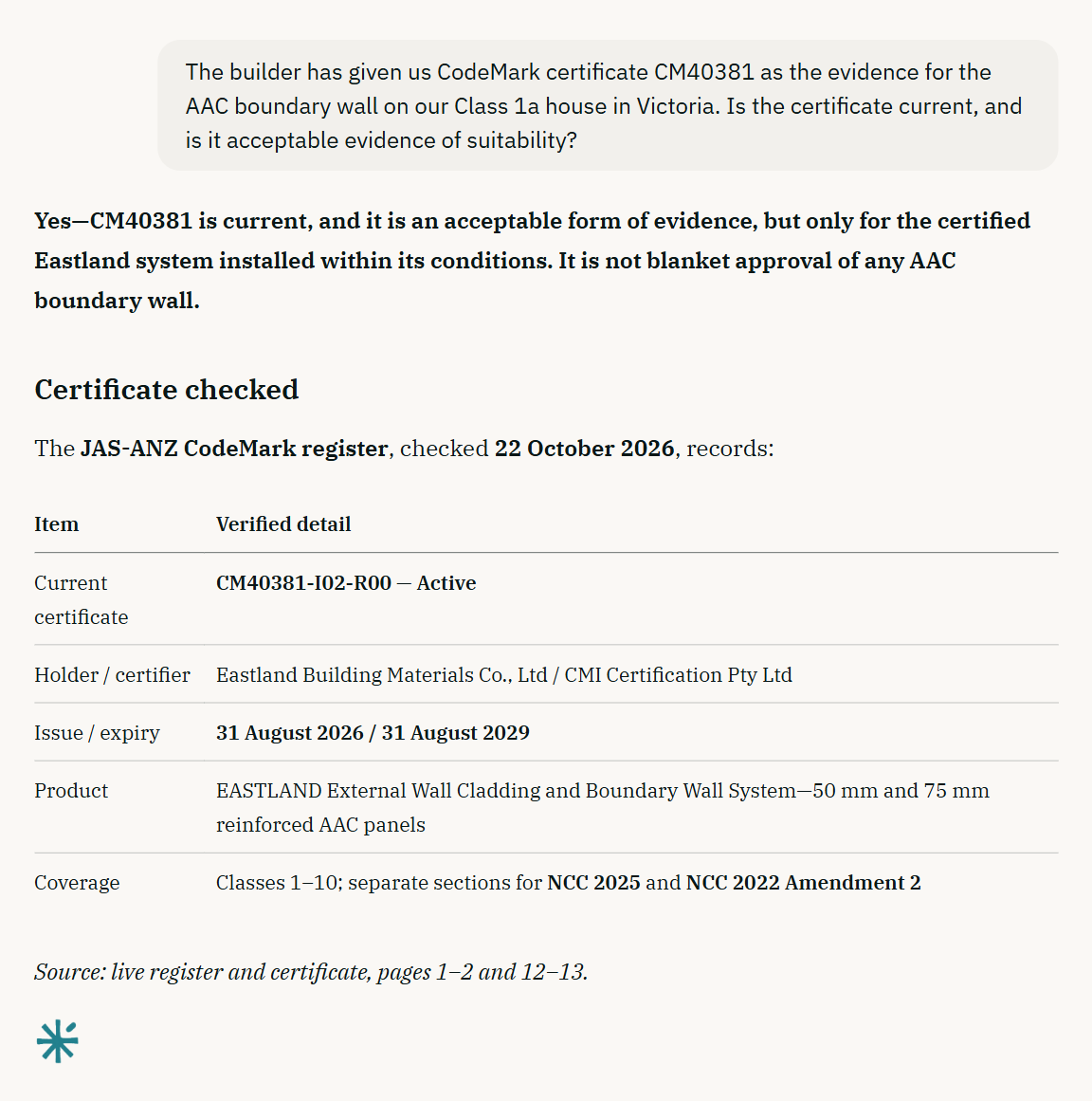
A certificate is evidence only while it is current and covers what will be built. When a certificate is offered as evidence of suitability, the assistant now checks it against the register as well as the copy you were given, so one that has since been suspended, withdrawn or reissued is caught.
Does the system achieve what the schedule says?
Wall type schedules carry figures that drift from the system they name. Here a schedule says WT-04 is CSR1065, with an FRL of 60/60/60 and an Rw+Ctr of 45. The assistant reads every variant of that system in CSR's current data: the fire rating is available, but no variant reaches Rw+Ctr 45. It names the evidence behind each figure, including where an acoustic figure is a prediction rather than a laboratory test.
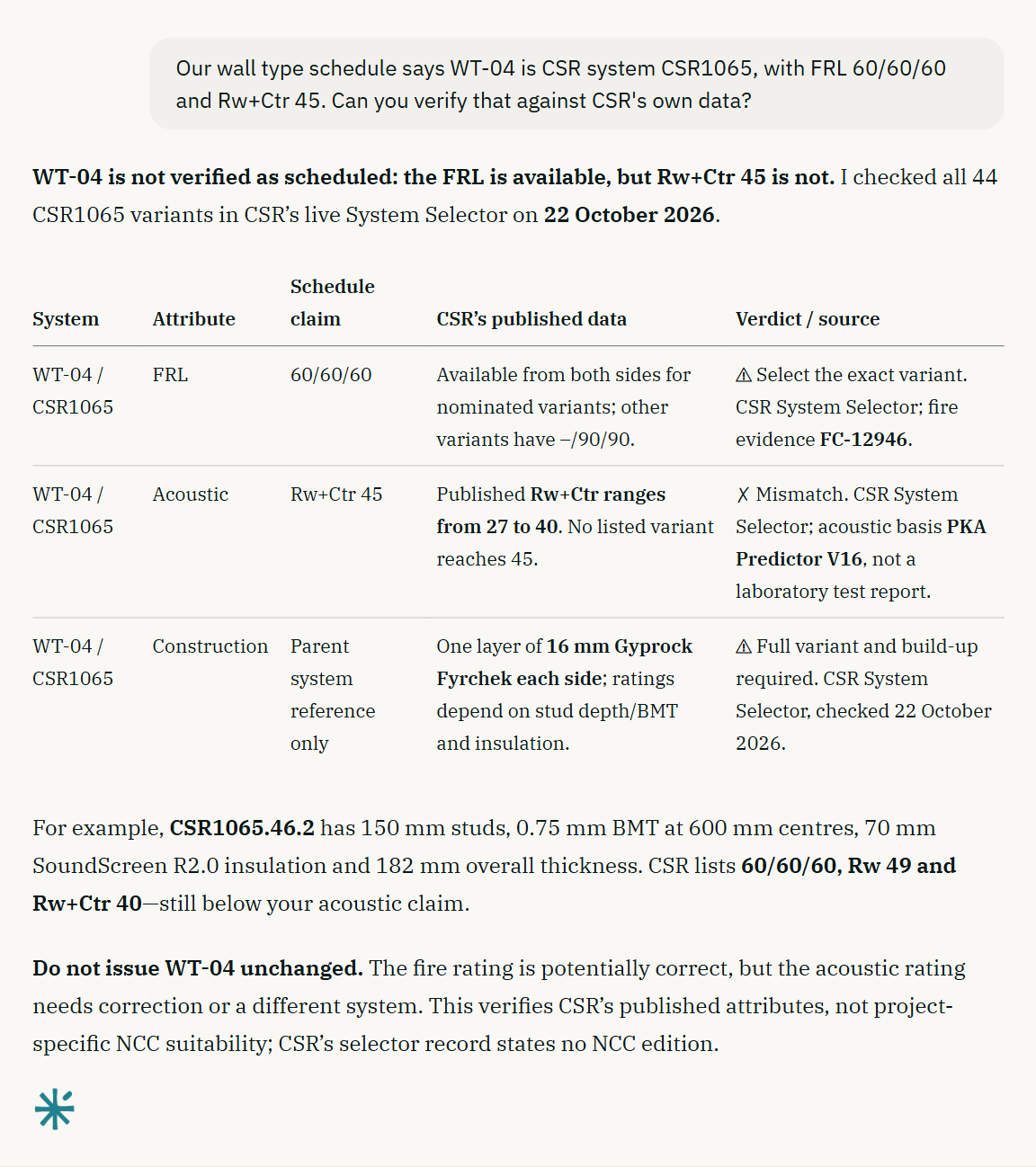
When a system falls short, or a builder proposes a substitute, ask for alternatives that meet the same FRL, Rw+Ctr and wall thickness. The assistant searches each manufacturer's published range and gives you the matching systems with their build-up and the evidence behind each figure, so a substitution starts from systems that are actually published.
Where it applies
Register and manufacturer checks are on every plan, the free Core plan included.
A register record supports the building surveyor's assessment; it is not an approval. A product with no register entry is not non-compliant either: many products rely on other evidence of suitability, such as a test report or an engineer's assessment, and the assistant says what it searched.
Where a manufacturer names a test or assessment report without publishing it, the assistant cites it by number and suggests asking the manufacturer for it when your item depends on it.
2. Calculators that hand your building surveyor a report
Roof and site drainage is now in Tools beside the NCC calculators, to AS/NZS 3500.3:2025 and AS/NZS 3500.1:2025: roof catchments, eaves and valley gutters, downpipes and overflow, box gutters and sumps, balconies, terraces and flat roofs, stormwater pipes, pits and overland flow, on-site detention, pump-outs and water supply pipe sizes.
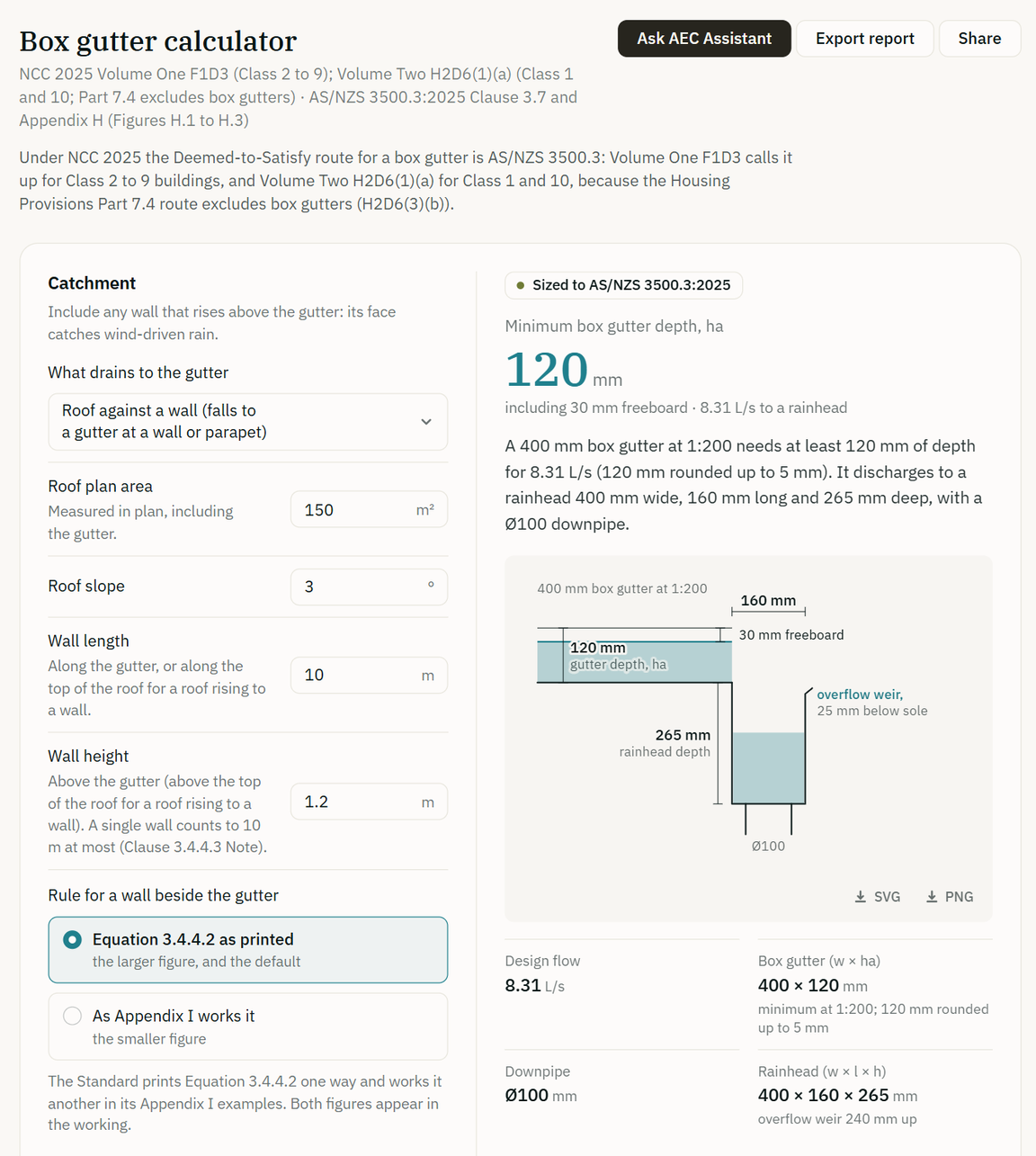
A report for every calculation. Every calculator, the NCC tools included, exports a calculation report for your building surveyor. A drainage report sets out the design basis, the inputs, every check with its clause and the full working, and ends with a sign-off for the person who prepared it and the person who checked it. Share copies a link that opens the calculator with your inputs.
Sizing from chat. Ask the assistant to size a gutter, a downpipe, a box gutter or a pipe, and it asks for the inputs that decide the answer, one question at a time, instead of assuming them. It then runs the calculator and gives you the calculator filled in and its report.
From a calculation to chat. Ask AEC Assistant beside every calculator takes your calculation into chat, where the assistant explains it and tries changes with the same calculator.
The next step, filled in. After a result, a drainage calculator links the one to run next, such as the overflow for an eaves gutter or the stormwater pipe for a box gutter, with the figures carried across.
Figures as the drawings give them. Enter a roof pitch as 1:4 or 25%, a fall as 1:200 or 5 mm/m, and a ramp's levels as the RLs on your drawings.
More routes and products. The eaves gutter calculator also sizes by the NCC 2025 Housing Provisions Part 7.4 tables where they apply, and lets you choose a gutter from a maker's range. The ramp calculator now works out the run a rise needs.
The calculators are free to use without an account; Export report and Share need a free account. The drainage calculators and most of the NCC calculators can also be used on our website.
3. More of the job, reviewed
Since Update 5 the assistant has taken on more of the work that crosses an architect's, builder's or building consultant's desk. Each starts from the drawings and documents you attach.
House plans. Check a Class 1 or 10 design against the Deemed-to-Satisfy provisions for footings, wind classification, timber framing, bracing and tie-down, termites, safety glass, balustrades, fire separation and smoke alarms, with a clear line where an engineer is needed.
Energy. Check a NatHERS certificate against the plans, read BASIX certificates and Section J reports, and apply the edition NCC 2025 sets for apartments.
Siting. Check setbacks, site coverage, height, overlooking and private open space against your state's rules, measured from the drawings, and get indicative site area, frontage, slope and cut and fill from survey, GIS and terrain files.
Site safety. Draft a SWMS, a WHS management plan, a site induction or a risk register from your project details, with every site fact left for you to fill in, or have a subcontractor's SWMS checked.
Quantities. Measure floor areas, lengths, counts and volumes from drawings and models into a bill of quantities spreadsheet, each quantity with its source.
Contracts and programmes. Build a notice and time-bar register from the contract and the correspondence, level quotes or tenders side by side, and read a Primavera P6 programme to find the critical path or test a delay.
Revisions and correspondence. Compare two revisions of a drawing set and get an overlay of every changed sheet in one PDF for your transmittal. Write a further-information request, a register that closes out a resubmission item by item, an inspection and test plan with hold and witness points, or a site diary entry from your notes and photos.
4. Bring the files you work in
CAD, BIM, 3D and GIS files can now be attached in chat or added to a project, along with Primavera P6 programmes and Apple Pages, Keynote and Numbers files.
Larger files. Chat attachments can be up to 96 MB each, the same as project documents, and large and scanned drawing sets can now be read.
Small print, read. The assistant zooms in on the part of a sheet it needs, so it can read small dimensions, notes and symbols, and questions about a plan set use less of your weekly limit.
Photos with their real date. Site photos are dated from the camera's own record of when they were taken, and a photo without one is reported as undated.
5. Planning in the scheme's own words
Current wording. Planning reports now give the current wording of the zones, overlays and clauses that apply to a site, each with the amendment it reflects.
The right property. When a project's address is not exactly a property in the state's address register, the project page asks "Did you mean…?" with the closest real addresses, instead of reporting on a neighbouring property.
Sites of several lots. A project can be a consolidated site, and planning assessments look at each lot and then at the site as a whole.
No silent all-clears. A planning check whose source did not answer is reported as not checked, so a gap is never read as "none".
6. Sources that open at the page
When an answer draws on a page of a project document, it links to that page, and its sources show the page itself: click it to open the document there. Answers cite the published text of the NCC, Standards and regulations, and their NCC links match the edition the answer is written for.
Also in this update
A newer tuned model on paid plans. Plus and Max answers come from a newer, tuned revision of the model, built for complex professional work.
A first week with room to try it. A new Plus or Max subscription comes with twice the usual usage for its first seven days, so a real job does not run into the weekly limit on day one.
An up-to-date library. The NSW Work Health and Safety Regulation 2025, the current SA Planning and Design Code, the latest Victorian Building Regulations, WorkSafe Victoria compliance codes and the Building Commission NSW guides are in, and superseded documents are out.
The NCC's notes come through. Notes that sit outside clauses, such as the note sending Class 2 energy compliance to NCC 2022 Amendment 2 and each state's Part deletions, now appear in answers.
Plans, plainly
The free Core plan does the asking: the NCC, state building and planning legislation, ABCB handbooks, regulator practice notes and codes of practice, planning information for every state and territory, the product registers and manufacturer data in this update, and a weekly usage allowance. Plus and Max add the most capable model, deeper knowledge of the Standards the Code references, file uploads, and projects that hold your drawings, documents and site information. Details and current pricing are on the pricing page, and every change is listed in the release notes.
The next time a builder sends you a certificate, ask whether it is still current.
Update 5 was published on 23 September 2026. This update covers releases 1.10 to 1.19, from 27 September to 22 October 2026.